

Portable Solar Power System: Complete Sizing Guide

Portable Solar Power System sizing starts with your real devices, available sunlight, and required runtime.
A Portable Solar Power System gives you stored electricity away from a wall outlet. Reliable performance depends on matching every component to your real usage. Your devices, sunlight, travel plans, and available storage space matter more than simply buying the largest panel or battery.
Explore KEUTEK portable power solutions for travel-ready charging and backup power.
A Portable Solar Power System combines solar panels, a charge controller, and a battery or power station. The panels collect sunlight, and the controller regulates the input. The battery stores energy for later use. To size a system, calculate daily watt-hours and check peak wattage. Allow for conversion losses and keep a practical reserve.
This guide explains the system components and compares folding and rigid panels. It covers charge-controller ratings and shows how to estimate runtime for camping, road travel, remote work, RV use, and short-term outage preparation.
What Is a Portable Solar Power System and How Does It Work?
A Portable Solar Power System turns sunlight into stored electricity that you can use away from a wall outlet. A typical system includes a photovoltaic panel, charge controller, battery, inverter, and output ports. An integrated power station places most of those components in one enclosure, while a modular system keeps them separate for more customization.
The energy path is straightforward:
- Panels collect sunlight. Photovoltaic cells convert light into direct-current electricity.
- The charge controller regulates charging. It manages voltage and current before energy reaches the battery.
- The battery stores energy. Capacity is measured in watt-hours, or Wh.
- The inverter supplies AC power. It converts stored DC power into alternating current for compatible appliances.
- USB and DC outputs power compatible electronics. A direct output can avoid an unnecessary DC-to-AC-to-DC conversion.
A panel's watt rating describes potential output under specified test conditions. It is not a promise that the panel will produce that amount continuously outdoors. Sun angle, shade, cloud cover, heat, dust, cable losses, and controller behavior affect production. The U.S. Department of Energy's solar overview explains why photovoltaic output depends on system design and local conditions.
What is the difference between an integrated power station and a modular system?
An integrated power station combines storage, control electronics, an inverter, a display, and connection ports in one portable enclosure. It is usually the fastest option for travelers who want to connect compatible panels and begin using the system with minimal wiring.
A modular system separates the panel array, controller, battery, inverter, and cables. It can make sense when you want to expand capacity, mount panels in a vehicle, or replace one component without replacing everything. It also requires closer attention to voltage, current, connectors, battery chemistry, and inverter limits. KEUTEK's guide to portable solar power kits provides a useful overview of what a complete kit may include.
Which Solar Panels Fit a Portable Setup?
The right portable panel balances output, portability, deployment speed, and compatibility. Folding panels are convenient when you carry equipment from a vehicle to a campsite or store it between uses. Rigid framed panels can be better for an RV roof, van build, balcony, or repeatable emergency location.
Folding panels prioritize transport. Hinged sections, handles, and protective cases make them easier to pack, but the open panel still needs a broad, unshaded surface. Rigid panels take more room during transport and may require mounting hardware, yet their frames can simplify repeat placement.
Monocrystalline panels are common in portable equipment because their cell design can provide strong output from a compact footprint. That does not eliminate the need for adequate surface area. Choose a panel you will actually carry and deploy. A smaller panel used consistently can deliver more useful energy than a larger panel left at home.
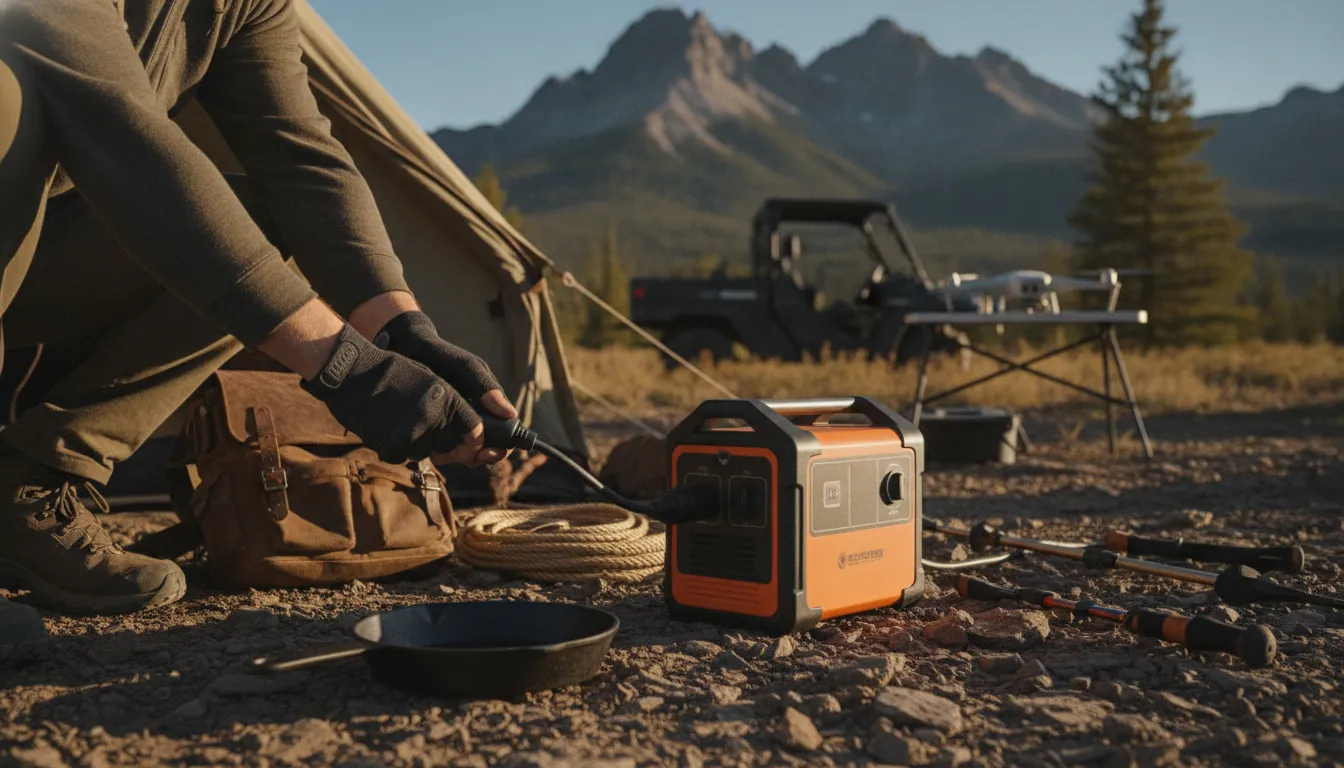
How should you compare folding, rigid, and bifacial panels?
| Panel type | Best fit | Advantage | Tradeoff |
|---|---|---|---|
| Folding monocrystalline panel | Frequent camping, road travel, and emergency deployment | It packs for transport and can be deployed without permanent mounting. | It needs a clear surface and careful handling around hinges and cases. |
| Rigid framed panel | RV roofs, vans, balconies, and fixed backup locations | It provides a stable mounting surface for repeatable placement. | It takes more storage space and usually requires mounting hardware. |
| Bifacial panel | Bright locations with reflective surfaces behind or below the panel | It can collect useful light from both sides when the installation allows it. | Any gain depends on clearance, reflection, sun angle, and weather. |
Bifacial designs need realistic expectations. Their rear side can benefit from reflected light, but a panel placed flat on dark ground may gain little additional energy. For most portable users, correct wattage, clear placement, durable construction, and easy deployment matter more than a headline efficiency claim.
How much panel wattage do you need?
Start with the battery capacity you need to replenish and the amount of usable sunlight available. A higher-watt panel can shorten recharge time when the power station accepts its additional input. The panel's voltage, current, connector, and total wattage must remain within the power station or controller's published limits. Oversizing beyond those limits is not a safe shortcut.
Angle the panel toward the strongest available sunlight and move it as the shade pattern changes. Avoid leaves, branches, vehicle shadows, and partial obstructions. A panel that is easy to reposition is often more useful than one that is difficult to carry or place.
Related products


How Do Charge Controllers and Power Stations Work Together?
A charge controller is the electrical traffic manager between the panel and the battery. In an integrated power station, it is normally built into the unit. In a modular Portable Solar Power System, it may be a separate component between the solar array and the battery. Correct voltage, current, connector, and input-wattage matching protects the system and supports predictable charging.
What is the difference between PWM and MPPT?
Pulse-width modulation, or PWM, is a simpler control method that brings panel voltage closer to battery voltage while regulating charging current. It can be practical for a small, closely matched setup.
Maximum power point tracking, or MPPT, continually adjusts the electrical operating point toward the panel's strongest available output. This can help a controller use changing solar conditions more effectively. It does not guarantee a fixed charging speed. Sunlight, temperature, shade, cabling, panel output, and the power station's input design still control actual results.
Which ratings must match before you connect a panel?
- Voc, or open-circuit voltage: the panel voltage when it is not supplying a load. The array must stay below the controller's maximum voltage, including changes that can occur in cold conditions.
- Imp, or current at maximum power: the approximate current produced at the panel's operating point.
- Maximum input watts: the total solar power the station is designed to accept.
- Connector and polarity: the physical connection must be compatible, not merely able to fit.
Series wiring raises voltage. Parallel wiring raises current. Either configuration is appropriate only when the resulting values remain within the controller's voltage, current, and wattage limits. If a specification is unclear, follow the equipment manufacturer's documentation instead of relying on a generic adapter. KEUTEK's portable power station and solar panel guide is another reference for checking compatibility.
How do inverter ratings affect device pairing?
The inverter's continuous watt rating must cover the running draw of devices used at the same time. Its surge or peak rating must also cover brief startup demands from motors, compressors, or similar loads. USB and DC ports have separate limits, so check those ratings as well.
How Do You Size a Portable Solar Power System for Real Usage?
Size storage and output separately. Watt-hours tell you how much energy the battery can store. Watts tell you how much power the inverter or output port can deliver at one time. Solar panel wattage affects how quickly you can replenish the battery. This distinction prevents a large battery from being paired with an undersized inverter or an incompatible panel.
- List every device. Write down running watts and expected hours of use. A 60-watt laptop used for five hours needs about 300 Wh. A 10-watt light used for six hours needs 60 Wh. A phone may use about 20 Wh for a daily recharge, while a 12-watt router used for eight hours needs about 96 Wh. This example totals 476 Wh before losses.
- Allow for conversion losses. Inverters and charging electronics do not deliver every stored watt-hour to the load. If exact efficiency is unknown, divide the load estimate by 0.85 as a planning assumption. In the example, 476 Wh divided by 0.85 is about 560 Wh.
- Add a reserve. Cloud cover, longer work sessions, cold temperatures, and unexpected loads can consume the margin. Adding 20% to the example produces a target near 670 Wh. A larger reserve is sensible for outage planning.
- Check simultaneous watts and surge. Add the running watts of devices that may operate together. Compare that total and any motor startup demand with the station's continuous and peak output ratings.
- Estimate solar recovery conservatively. Multiply panel watts by usable peak-sun hours, then reduce the result for shade, heat, angle, cables, and controller losses. A 200-watt panel exposed to 3.5 usable sun hours has a 700 Wh theoretical starting point, not a guaranteed field result.
| Use case | Practical storage target | Output check |
|---|---|---|
| Phones, lights, and small electronics | About 300 to 600 Wh, including reserve | Choose continuous output above the combined running load. |
| Laptop, router, camera gear, and cooler | About 700 to 1,200 Wh, depending on runtime | Allow additional peak output for compressor startup. |
| Essential outage loads | Calculate each device separately and add a larger reserve. | Confirm medical-device requirements with the device manufacturer or care team. |
These figures are planning examples, not runtime promises. A station near 700 Wh paired with a 200-watt panel could support a moderate travel day if sunlight and load assumptions cooperate. It may not fully replace that day's use in shade or cloudy weather. More storage helps cover weak solar periods. More panel capacity can speed recovery when the station accepts it.
For additional load-planning examples, read KEUTEK's portable solar power station buyer's guide and compare the power requirements of the devices you actually carry.
What Can a Portable Solar Power System Run While Traveling?
A Portable Solar Power System can support phones, tablets, laptops, lights, camera batteries, routers, and some coolers when the equipment is correctly matched. The practical limit depends on both total energy and instantaneous output. Small electronics are generally easier to support than heating appliances, air conditioners, or motor-driven loads.
Which devices are easiest to support?
USB electronics are usually the simplest loads. Use a power station's USB output when voltage and power specifications match, rather than routing a small device through the AC inverter. This can avoid an unnecessary conversion step. Laptops are also practical when their charger requirements match a USB-C Power Delivery output or the station's AC inverter.
LED lights, camera batteries, drones, and other small electronics can provide useful service with modest energy demand. If you carry several batteries, charge them in rotation and monitor the station's remaining capacity instead of assuming a full day of unlimited use. KEUTEK's portable solar power bank is another compact option for smaller charging needs.
Can it run a router, cooler, or refrigerator?
It can, within the station's output and storage limits. A router and modem may be manageable continuous loads for remote work or communications during an outage. A cooler or compact refrigerator requires more care because its compressor creates a brief startup demand and cycles over time.
Check both the appliance's running watts and surge requirement. The inverter must handle the surge, and the battery must have enough watt-hours for the intended operating period. Do not connect medical equipment or other critical loads until the device manufacturer or care team confirms compatibility.
What about emergency and medical equipment?
A solar-charged battery system can help keep essential household devices available during an outage. The CDC power-source guidance includes solar-charged battery systems among alternative power sources.
Medical equipment requires a separate safety review. CPAP machines, oxygen concentrators, powered mobility equipment, and similar devices may have specific requirements for voltage, waveform, startup capacity, and runtime. A published evaluation of solar-powered battery systems for people who use electricity-dependent medical devices after a disaster is available through PubMed. Ask the device manufacturer or care team to confirm compatibility, test the complete backup setup before an emergency, and keep a contingency plan.
How Can You Set Up and Maintain a Travel-Ready System?
Set up the system in a repeatable order. Put the panel in an open, stable location. Confirm the station or controller is switched off before making connections. Verify panel Voc, current, wattage, connector, and polarity against the input specifications. Connect the panel using the approved cable, then start charging and check the display for expected input.
After the battery reaches the desired charge, connect devices one at a time. Keep the station ventilated, dry, and away from standing water. Do not cover cooling vents or place equipment where a vehicle cabin can become dangerously hot. Keep cables organized so they do not become trip hazards or develop sharp bends.
What maintenance protects performance?
- Wipe dust and residue from panel surfaces using the method recommended by the panel manufacturer.
- Inspect cables, connectors, hinges, and protective cases before each trip.
- Store the battery at the charge level recommended by its manufacturer.
- Keep the system in a cool, dry location away from direct heat.
- Review firmware, safety notices, and input limits when the manufacturer provides updates.
- Test the complete system periodically instead of waiting for an outage.
For travel, prioritize equipment durable enough for repeated handling and compact enough to bring along. KEUTEK's premium portable power approach emphasizes travel-ready charging, universal compatibility, and rugged construction. These are useful design priorities when a system moves between home, vehicle, campsite, and backup locations. The company's about page provides additional information about its warranty and customer commitment.
FAQs: Portable Solar Power System
What is the most important sizing number?
Start with daily watt-hours, then check continuous and surge watts separately. Storage answers how long devices can run. Output ratings answer whether the system can power them at the same time. Panel wattage determines how quickly the battery can recover when sunlight and input limits are favorable.
Is a larger solar panel always better?
No. A larger panel helps only when the power station or controller accepts its voltage, current, and wattage. It also needs to be practical to transport, position, and protect. A well-matched panel that you deploy consistently is often the better choice for a portable system.
Can a portable solar system run medical equipment?
It may be possible, but capacity alone does not prove compatibility. Confirm voltage, waveform, startup, runtime, and charging requirements with the equipment manufacturer or care team. Test the complete backup arrangement before it is needed, and keep another contingency plan available.
Should you choose an integrated station or separate components?
An integrated station is usually simpler and faster to deploy. Separate components can offer more flexibility for expansion or fixed installations. Choose the format that matches your technical comfort, transport needs, and plans for future changes. In either case, follow the equipment documentation.


Leave a comment