

USB-A to Lightning Cable: Compatibility, Speed, and Buying

For many older iPhones, iPads, and everyday charging setups, the connector on the device is only half the decision. The other half is the port on the charger, laptop, vehicle, or travel power hub. That is why this cable format remains useful, even as newer devices increasingly move to USB-C.
KEUTEK ProSeries Max fast charging cable combines premium durability with MFi-certified compatibility for dependable Apple charging.
A usb-a to lightning cable connects a Lightning-equipped Apple device to a traditional USB-A port. It is broadly useful for charging and, where supported, data transfer, but USB-A typically offers less power than USB-C Power Delivery, so charging can be slower. The right choice also depends on MFi certification, cable construction, connector fit, and the demands of daily travel or heavy use.
Understanding what each connector does makes compatibility easier to judge and helps separate a cable that merely works from one engineered for dependable performance. Start with the two interfaces and how they work together.
What Is a USB-A to Lightning Cable?
A USB-A to Lightning cable has two different connectors designed to work together. One end uses the familiar rectangular USB-A plug, which connects to a compatible port on a laptop, wall adapter, power bank, or vehicle charger. The other end uses Apple's compact Lightning connector, which plugs into supported iPhone, iPad, and other Apple devices.
That arrangement makes the cable a practical bridge between older USB charging equipment and Apple hardware. If your desk charger, travel adapter, or car still has a USB-A port, a USB-A to Lightning cable lets you charge a compatible device without replacing the entire setup. It can also support data communication when connected to a computer, allowing tasks such as syncing information or transferring supported files.
How does the USB-A end work?
USB-A is a connector type used within the Universal Serial Bus standard. USB provides a common interface that allows computers and consumer electronics to communicate and deliver power, according to the National Institute of Standards and Technology's USB glossary. The USB Implementers Forum maintains and promotes USB specifications, but USB-A itself describes the physical plug shape, not every capability of the cable or charger.
This distinction matters because the USB-A port determines how the cable connects to the power source, while the adapter and device determine the charging behavior. A higher-output wall adapter cannot make every USB-A connection perform like USB-C Power Delivery. For a deeper explanation of that newer charging standard, see this guide to USB-C Power Delivery.
What does the Lightning end do?
The Lightning connector is the device-side plug used by many earlier Apple products. Its reversible design makes insertion convenient, and its small profile works well in compact phones, tablets, and accessories. The connector carries power and, with compatible hardware, data between the Apple device and the USB-A source.
In practical terms, this cable is best understood as a connection standard pairing: USB-A on the source side and Lightning on the Apple-device side. Checking both ends before buying helps prevent a mismatch. If your charger has a rectangular USB-A port and your device has a Lightning port, this is the cable format you need. For reliable daily use, also look beyond connector shape. Consider certification, strain relief, conductor quality, and construction. These details affect how consistently the cable performs over time.
USB-A to Lightning Compatibility with Older iPhones and iPads
Apple has used the Lightning connector since 2012, making it a familiar connection for a broad range of older iPhone and iPad models. If you still rely on a device with a Lightning port, a USB-A to Lightning cable can connect it to the USB-A ports found on legacy wall chargers, laptops, desktops, vehicles, battery packs, and travel hubs.
That compatibility extends beyond phones and tablets. Any accessory designed with a Lightning port can use the same cable type, including selected e-readers, game controllers, keyboards, and other portable electronics. The important detail is the port on the device itself. A Lightning device needs a Lightning connector at the device end, while the USB-A plug connects to the available power or data source.
Which older Apple devices use Lightning?
Many generations of iPhone and iPad use Lightning, along with certain iPod touch models and Apple accessories. Older iPhones such as the iPhone 5 and later moved to this connector, and numerous iPad models adopted it before newer devices began transitioning to USB-C. Model-specific charging performance can vary, but the physical connection remains straightforward: match the Lightning end to the device and the USB-A end to the charger or host port.
Compatibility does not mean every cable delivers the same experience. A cable can fit securely and still provide inconsistent charging, unreliable data transfer, or repeated accessory warnings if its internal components are poorly made. This is especially frustrating with older devices that remain useful for travel, navigation, vehicle entertainment, or backup communication.
Why does MFi certification matter?
For dependable Apple compatibility, look for MFi, or Made for iPhone, certification. Apple's MFi program is a licensing program intended to ensure that approved accessories meet relevant safety and performance requirements for Apple devices. You can review the program at Apple's MFi resource.
MFi certification helps distinguish a purpose-built accessory from an unverified cable that merely uses the right connector shape. It supports more predictable communication between the cable and device, which matters when charging, syncing files, or connecting an older iPhone or iPad to a computer. It also provides an important quality signal when you are replacing a cable for a device you expect to keep using.
KEUTEK ProSeries USB-A to Lightning cables use MFi-certified chips for reliable performance and compatibility with Apple devices. For more guidance on matching chargers and Apple hardware, see this explanation of iPhone charging cable compatibility. The right connector, a certified chip, and a properly rated power source give older Lightning devices a dependable connection. You can keep using equipment that still meets your needs.
How Fast Does a USB-A to Lightning Cable Charge?
A USB-A to Lightning cable is a dependable option for charging many older iPhone and iPad models. But its maximum practical speed is usually lower than what a modern USB-C Power Delivery setup can provide. With a standard USB-A charging port, expect roughly 12W at the upper end of typical output. That is sufficient for reliable everyday charging, especially overnight or at a desk, but it can take longer to replenish a depleted battery.
The limitation is not created by the Lightning connector alone. The charging path includes the wall adapter or power bank, the USB-A port, the cable, and the device. The port establishes how much power is available. A basic USB-A port may deliver less than 12W, while a compatible high-output charger can approach that level. The charger must also be able to maintain its rated output under load. NIST's battery charger test procedure provides the measurement context for evaluating charger energy performance.
What determines real-world charging speed?
Four factors matter most:
- Port output: The USB-A port and its charging standard determine the power ceiling. A low-output computer port generally charges more slowly than a dedicated wall adapter.
- Charger rating: A charger rated for multiple devices may divide available power when several ports are in use. Check the output for the specific port, not only the total wattage printed on the adapter.
- Cable construction: Conductor size and overall build quality affect how efficiently power reaches the device. A sound cable helps deliver consistent performance, while worn or poorly made conductors can create interruptions or reduced output.
- Device acceptance: The iPhone or iPad controls how much power it accepts at a given battery level and temperature. Charging commonly slows as the battery approaches full to manage heat and battery longevity.
- Cable condition: Frayed jackets, bent connectors, and intermittent contact can reduce reliability even when the charger and device are otherwise compatible.
For faster charging, USB-C Power Delivery pairs a USB-C port with a compatible adapter and cable, giving newer devices access to a higher-power charging path. An in-depth explanation of USB-C Power Delivery covers why that standard can outperform a conventional USB-A connection. Choose USB-A to Lightning when your existing charger, vehicle port, travel adapter, or power bank uses USB-A. Choose USB-C when both the charger and device support the newer standard.
Related products


USB-A to Lightning vs USB-C: Which Cable Should You Choose?
The right cable depends less on the connector's appearance than on the ports, devices, and charging standards in your setup. A USB-A to Lightning cable remains a practical choice for an iPhone or iPad with a Lightning port when your charger, vehicle, laptop, or power bank still uses USB-A. USB-C becomes the stronger option when both the power source and device support USB-C, especially when fast charging or newer data capabilities matter.
USB-A is a universal interface used for communication and power across computers and consumer electronics, according to the National Institute of Standards and Technology. USB-C describes a newer connector format, but the actual experience still depends on the charger, cable, and device working together. Use this comparison to match the cable to the situation rather than choosing solely by connector size.
| Consideration | USB-A to Lightning | USB-C |
|---|---|---|
| Charging speed | Generally supports charging up to about 12W, so it is suitable for routine charging but slower than USB-C Power Delivery fast charging. | Can support higher charging performance when the device, cable, and USB-C Power Delivery charger are compatible. |
| Data transfer | Supports data syncing between a Lightning device and a USB-A computer or accessory, with performance determined by the device and cable design. | Supports data transfer between compatible USB-C devices, with speed determined by the specific USB standard and hardware in use. |
| Compatibility | Works when an older iPhone or iPad has a Lightning port and the available charger or computer has a standard USB-A port. | Works when the device and power source use USB-C, including setups built around compatible USB-C Power Delivery ports. |
| When to use it | Choose it for existing USB-A wall chargers, cars, laptops, travel adapters, and Lightning devices that do not need the higher potential of USB-C PD. | Choose it for newer USB-C devices, USB-C charging ecosystems, and compatible setups where faster charging or newer transfer standards are a priority. |
For many older Apple devices, a USB-A to Lightning cable is still the most convenient match because it connects familiar power sources to the device you already own. Its roughly 12W ceiling is a meaningful limitation, not necessarily a defect: the cable cannot create USB-C PD performance when the source uses USB-A. Because USB-A supplies less power than USB-C Power Delivery, USB-A to Lightning charging is generally slower than a compatible USB-C setup. So choose USB-C when every component in the chain supports it.
Build quality also matters in either format. A cable that repeatedly bends near the connector, loses reliable contact, or uses an uncertified Lightning component can undermine an otherwise suitable setup. For a dependable USB-A to Lightning option, look for verified compatibility, reinforced construction, and a warranty that matches how often the cable travels with you.
Why MFi Certification Matters for a USB-A to Lightning Cable
MFi stands for Made for iPhone, Apple's licensing program for accessories designed to work with Apple devices. The program helps establish that a compatible accessory meets Apple's requirements for safety, performance, and device compatibility. That matters because a cable is not simply a length of wire. It also has to communicate correctly with the device and manage power consistently. Apple's MFi program provides the relevant certification framework.
What does MFi certification improve?
A certified USB-A to Lightning cable is designed to provide a more dependable connection between a Lightning device and a USB-A charging port. In everyday use, that can mean more reliable charging, steadier data synchronization, and fewer accessory-related warning messages. Certification does not make every cable indestructible or guarantee a particular charging speed. It does provide meaningful assurance that the cable's Lightning components were developed for the Apple accessory ecosystem rather than assembled without the required compatibility controls.
This is especially useful with older iPhones and iPads, vehicle USB-A ports, computers, and legacy wall chargers. If the cable repeatedly disconnects, triggers an accessory warning, or fails to sync, the problem may be more than inconvenience. An uncertified or poorly made cable can make it difficult to tell whether the issue comes from the device, charger, port, or cable itself.
Why is certification also a safety consideration?
Charging equipment should be selected with safety and compliance in mind. The National Park Service identifies overheating in portable electronics and battery chargers as a significant concern and recommends certified, compliant charging equipment to help minimize related risks. MFi certification is not a substitute for a quality power adapter, sound outlet, or safe charging practices, but it is one useful signal when choosing a Lightning accessory.
KEUTEK ProSeries USB-A to Lightning cables use MFi-certified chips to support reliable performance and compatibility with Apple devices. That electronic foundation works alongside the cable's physical construction, including aramid fiber designed to resist everyday wear. For a cable that may travel between a desk, car, and carry-on bag, choosing certified components reduces uncertainty and helps keep charging and data transfer dependable over time.
How to Choose a Durable USB-A to Lightning Cable
A durable cable is engineered for the stress it encounters every day. It must handle repeated bends at the connector, tension across a room, friction inside a travel bag, and thousands of insertion cycles. When comparing a USB-A to Lightning cable, look beyond the outer color or braid pattern. The construction beneath the surface determines whether the cable remains dependable after months of charging and data transfers.
What should you look for in the cable jacket?
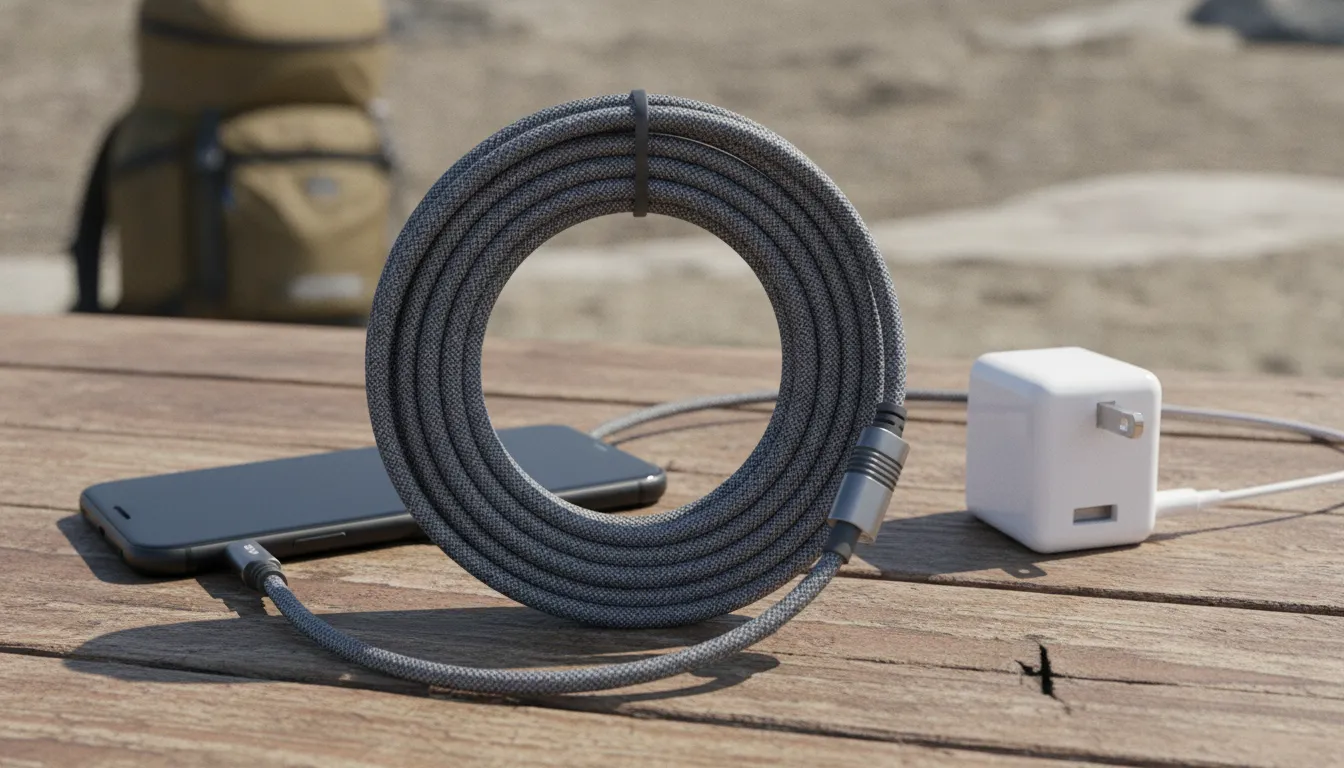
Braided nylon can help a cable resist surface abrasion and everyday tangling, while aramid fiber adds a stronger reinforcement layer without making the cable excessively rigid. Aramid fibers are designed to handle tensile stress, which is useful when a cable is pulled, folded, or routed around a bedside table. A well-made jacket should feel flexible enough to position naturally, but not so loose that it exposes the inner conductors when bent.
Also inspect the transition between the cable and each connector. Reinforced strain relief reduces the sharp bend that commonly develops where the jacket meets the plug. This detail matters because a cable can look intact while repeated bending gradually damages its internal connections. A smooth, supported transition is a practical sign of durability engineering, not just cosmetic design.
Do bend-test and tensile ratings matter?
They provide useful evidence when the ratings come from meaningful product testing rather than vague claims. A bend rating indicates how a cable performed through repeated flexing, while tensile strength describes the force it can withstand before the assembly fails. These measurements do not guarantee that every cable will last forever, because real-world use varies, but they offer a more useful comparison than simply choosing the thickest-looking option.
KEUTEK ProSeries USB-A to Lightning cables are built with aramid fiber and tested for more than 30,000 bends, with a tensile strength rated at 220 pounds. Those specifications address the two failure patterns shoppers encounter most often: fatigue from repeated bending and damage caused by accidental pulling. The cable still should not be deliberately stretched, knotted, or sharply folded, but its construction is designed for demanding daily and travel use.
Why does the warranty complete the durability picture?
A lifetime warranty signals that the manufacturer stands behind the construction after the initial purchase. Review the warranty terms and confirm what is covered before buying. KEUTEK pairs its ProSeries durability design with a lifetime warranty, giving buyers an additional layer of support when a qualifying product issue occurs. For a cable that travels between home, work, and the car, that combination of tested materials, reinforced connectors, and long-term coverage is a stronger value than a low upfront price alone.
KEUTEK ProSeries Max fast charging cable is built for reliable, travel-ready charging with reinforced durability.
Frequently Asked Questions
What is a USB-A to Lightning cable used for?
A USB-A to Lightning cable connects an iPhone, iPad, or other Lightning-equipped Apple device to a USB-A wall charger, computer, vehicle port, power bank, or travel hub. It can charge the device and, when the hardware supports it, transfer data. It is especially useful when your existing charging ports still use the larger rectangular USB-A connection.
Is Lightning a USB-A connector?
No. USB-A describes the connector on one end of the cable, while Lightning describes the Apple connector on the device end. A USB-A to Lightning cable therefore combines two different connector standards. The USB standard supports communication and power across consumer electronics, including USB-A connections, but it does not make Lightning and USB-A interchangeable.
Does an iPhone use USB-A or USB-C?
The answer depends on the iPhone model. Older iPhones with Lightning ports require a Lightning cable on the device end. So a USB-A to Lightning cable remains compatible when the power source has a USB-A port. Newer iPhones may use USB-C instead. Check the port on your specific iPhone before buying, and choose a cable with an MFi-certified connector when you need a Lightning accessory. Apple's MFi program is designed to support accessory safety and compatibility: Apple MFi.
How fast does a USB-A to Lightning cable charge?
Charging speed depends on the cable, power adapter, device, and battery conditions. USB-A charging is generally limited to about 12W of practical output, which is slower than USB-C Power Delivery charging. A quality cable cannot remove the USB-A port's power limit, but certified construction can support reliable charging and reduce the risk of connection problems.
Does a USB-A to Lightning cable support fast charging?
A USB-A to Lightning cable can charge quickly only as fast as the USB-A port and the adapter allow. Most USB-A ports and chargers are limited to roughly 12W of output, so USB-A to Lightning charging is slower than USB-C Power Delivery. The cable itself does not set the power ceiling; the source port and power adapter do. For genuinely fast charging, you need a compatible USB-C Power Delivery charger and cable on both ends.
How do I know if a USB-A to Lightning cable is MFi certified?
Check the product listing for a Made for iPhone badge or a statement that the accessory is MFi certified, and confirm the brand participates in Apple's licensing program. A certified cable is designed to meet Apple's requirements for safety, performance, and device compatibility, which reduces the chance of connection errors or compatibility warnings. Apple's MFi program sets the certification framework many reputable cable brands follow.
Ready to Upgrade Your Charging Setup?
A dependable cable can make everyday charging more consistent, especially when you still rely on USB-A ports for your Apple devices. KEUTEK combines premium construction, MFi-certified compatibility, and travel-ready durability in one practical solution. Shop the KEUTEK ProSeries Max fast charging cable to build a more reliable charging setup for your compatible devices.


Leave a comment